
Gadgets and Tech
5 min read
How to Choose an xTool UV Printer, F2 Ultra & Apparel Printer
September 02 , 2026
By Wallace Bixby
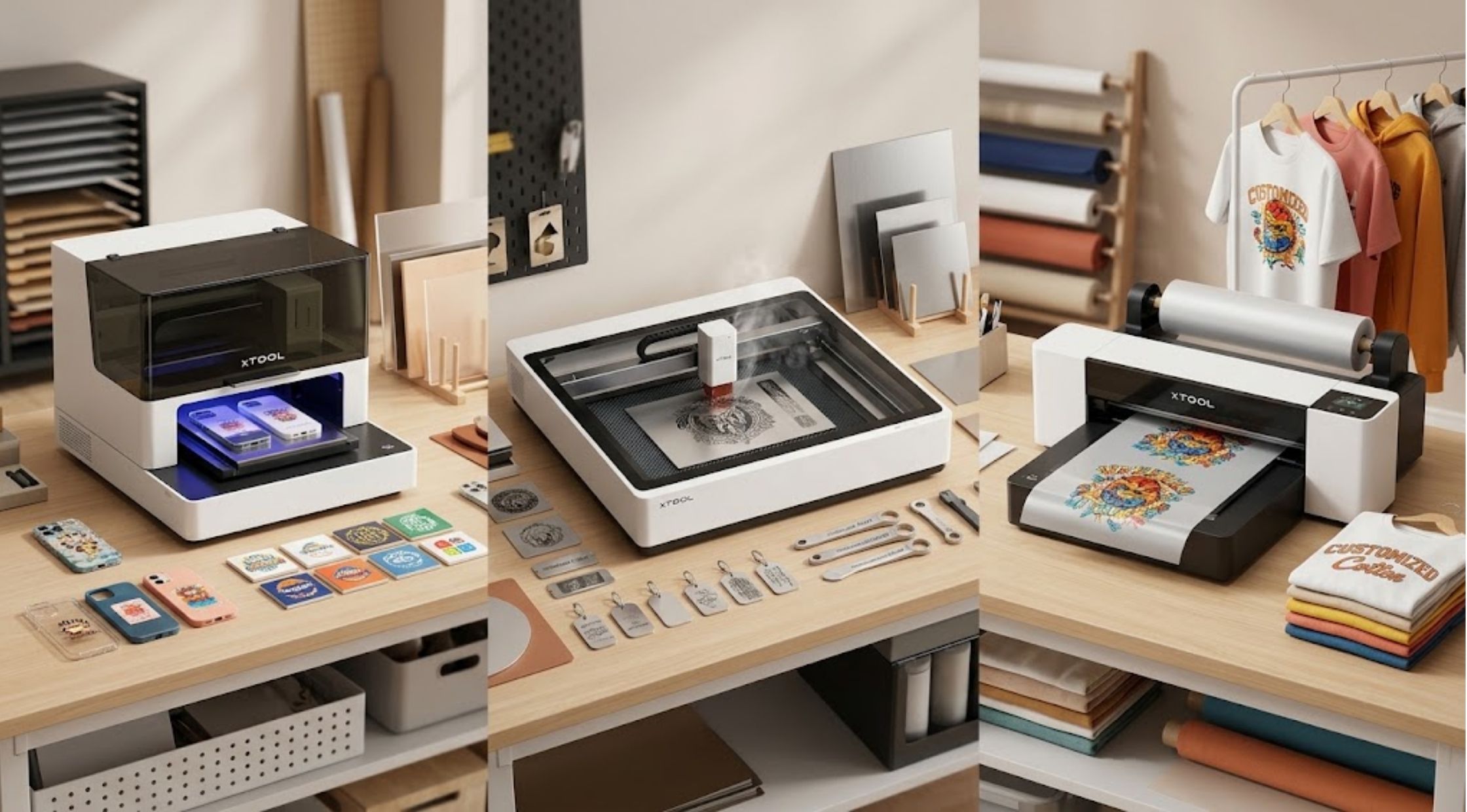
Selecting the right xTool machine depends on the physical materials you plan to decorate, your expected production volume, and your workshop space.
Selecting the right xTool machine depends on the physical materials you plan to decorate, your expected production volume, and your workshop space. Choosing between an xTool UV printer, the xTool F2 Ultra laser system, and an xTool Apparel printer involves understanding their specific capabilities.
1. xTool UV Printers: Best for Hard & Rigid Substrates
xTool UV printers (such as the 4-in-1 xTool O1 Omni Printer) use ultraviolet light to instantaneously cure specialized inks directly onto rigid or surface-treated materials.
Primary Applications
- Rigid Items: Acrylic, glass, wood, coated metal, ceramic tiles, slate, and phone cases.
- 3D & Specialty Effects: Multi-layer white and gloss varnish printing, 3D textured embossments (up to 7mm), and lenticular artwork.
- Promotional Merchandise: Customized keychains, awards, signage, drinkware, and branded corporate gifts.
Key Selection Factors
- Print Area & Height Clearance: Verify that the printer bed supports the depth and physical footprint of your target items.
- Ink Configuration & Curing: Look for CMYK + White + Varnish ink setups to enable bright prints on dark surfaces and protective clear coatings.
- Maintenance Needs: UV inks require automatic printhead agitation, white ink circulation, and regular capping maintenance to prevent ink drying.
2. xTool F2 Ultra: High-Speed Fiber & Diode Laser Processing
The xTool F2 Ultra is a high-speed galvo laser system (using a 60W MOPA Fiber Laser combined with a 40W Blue Diode Laser) rather than an ink-based printer. It operates via galvanometer mirrors that direct laser beams at speeds up to 15,000 mm/s.
Primary Applications
- Metal Processing: Deep engraving, cutting thin metals (brass, stainless steel, aluminum), and MOPA structural color oxidation.
- Deep Relief & Embossing: High-precision 3D relief carving in stone, metal, wood, or dense plastics.
- Industrial & Commercial Production: Batch marking serialized metal tags, tools, jewelry, and anodized aluminum goods.
[ Fiber (MOPA 60W) ] ---> Metals, Color Oxidation, Plastics
[ Diode (40W) ] ---> Wood, Leather, Opaque Acrylic, Glass Marking
Commercial Evaluation Checklist
- Production Volume: Galvo mirror technology allows the F2 Ultra to mark items in seconds, making it ideal for high-throughput batch orders.
- Work Area: Features a standard 200 × 200 mm galvo marking area, expandable using automated conveyor belt accessories.
- Safety & Ventilation: Requires a dedicated, fully enclosed cabinet with inline fume extraction due to fine particulate and metallic vapor generation.
3. xTool Apparel Printers: Direct-to-Film (DTF) Textile Customization
An xTool Apparel Printer uses Direct-to-Film (DTF) technology. It prints CMYK + White ink designs onto a clear transfer film roll, applies hot-melt adhesive powder, cures the film, and heat-presses the design onto garments.
Primary Applications
- Fabric Compatibility: Works on cotton, polyester, denim, canvas, nylon, spandex, and blended textiles.
- Garment Production: Custom t-shirts, hoodies, uniforms, tote bags, hats, and sportswear.
- Dark & Light Textiles: Dual printheads deposit a solid white ink base coat beneath full-color CMYK layers for opacity on black or dark fabrics.
Key Selection Factors
- Workflow Automation: Pairing the printer with an automatic shaker-oven machine automates powder application, shaking, and curing.
- Printhead Maintenance: White DTF ink settles quickly; look for integrated 24/7 white ink circulation and auto-moisturizing systems to prevent printhead clogs.
- Production Speed: Dual-printhead systems can output up to 50 sq ft per hour for commercial fulfillment.
4. xTool Technology & Feature Comparison
|
Machine Line |
Core Technology |
Primary Compatible Materials |
Best Suited For |
Key Limitation |
|
xTool UV Printer |
UV-Curable Ink & UV LED Curing |
Acrylic, Wood, Coated Glass, Metals, Rigid Plastics |
On-demand merchandise, signage, 3D textured graphics |
Higher consumable ink costs; rigid substrates only |
|
xTool F2 Ultra |
60W MOPA Fiber + 40W Diode Galvo Laser |
Metals, Stone, Wood, Leather, Dark Plastics |
High-speed industrial batch marking, metal color engraving, deep relief |
Cannot print full-color graphics or CMYK images |
|
xTool Apparel Printer |
Direct-to-Film (DTF) Inkjet + Curing Oven |
Cotton, Polyester, Denim, Canvas, Blends |
Custom apparel, merchandise lines, high-volume garment transfers |
Requires heat press & adhesive powder shaker oven |
5. Tips for Launching & Maintaining Your Custom Shop
- Focus on a Specific Niche: Start with 2–3 core product lines (e.g., custom metal everyday carry items, printed acrylic signage, or graphic hoodies) before expanding your equipment catalog.
- Calculate Full Cost of Goods Sold (COGS): Account for blank substrates, specialty ink sets, film rolls, adhesive powders, maintenance fluids, electricity, and scrap rate when setting retail margins.
- Preventative Maintenance Routine:
- UV & DTF Printers: Run daily test prints, keep capping stations clear of dried ink, and perform automated nozzle flushes weekly.
- Laser Systems: Clean galvo field lenses with optical wipes and replace fume extractor filters regularly.
Final Thoughts
The best xTool machine comes down to your primary substrate. For full-color printing on hard, flat, or cylindrical items, choose an xTool UV printer. For rapid metal marking, color oxidation, and precise structural engraving, invest in the xTool F2 Ultra. For textile customization across any fabric type, the xTool Apparel DTF system delivers the necessary speed and color payoff.
live smarter
Shop smarter, live better, and stay ahead of the trends with our reliable recommendations!





trending
Gadgets and Tech
6 min read
How to Create a Cleaner, Smarter Pet Feeding Routine at Home
Fashion
7 min read
Right Products Online for Better Value and Everyday Convenience
Home and Garden
7 min read
How to Choose the Right Products Online for Better Value and Everyday Convenience
Health and Beauty
4 min read
Graymatter Bright Mind: A Smarter Daily Drink Mix for Mental Performance
Fitness and Sports
5 min read
Winter Hiking with The Right Essentials Decathlon
Travel
11 min read
The Ultimate Guide To Car Maintenance For Beginners
N/A
7 min read